Home
About me
Contacts

JDN Browser extension, B2B tool
About Project
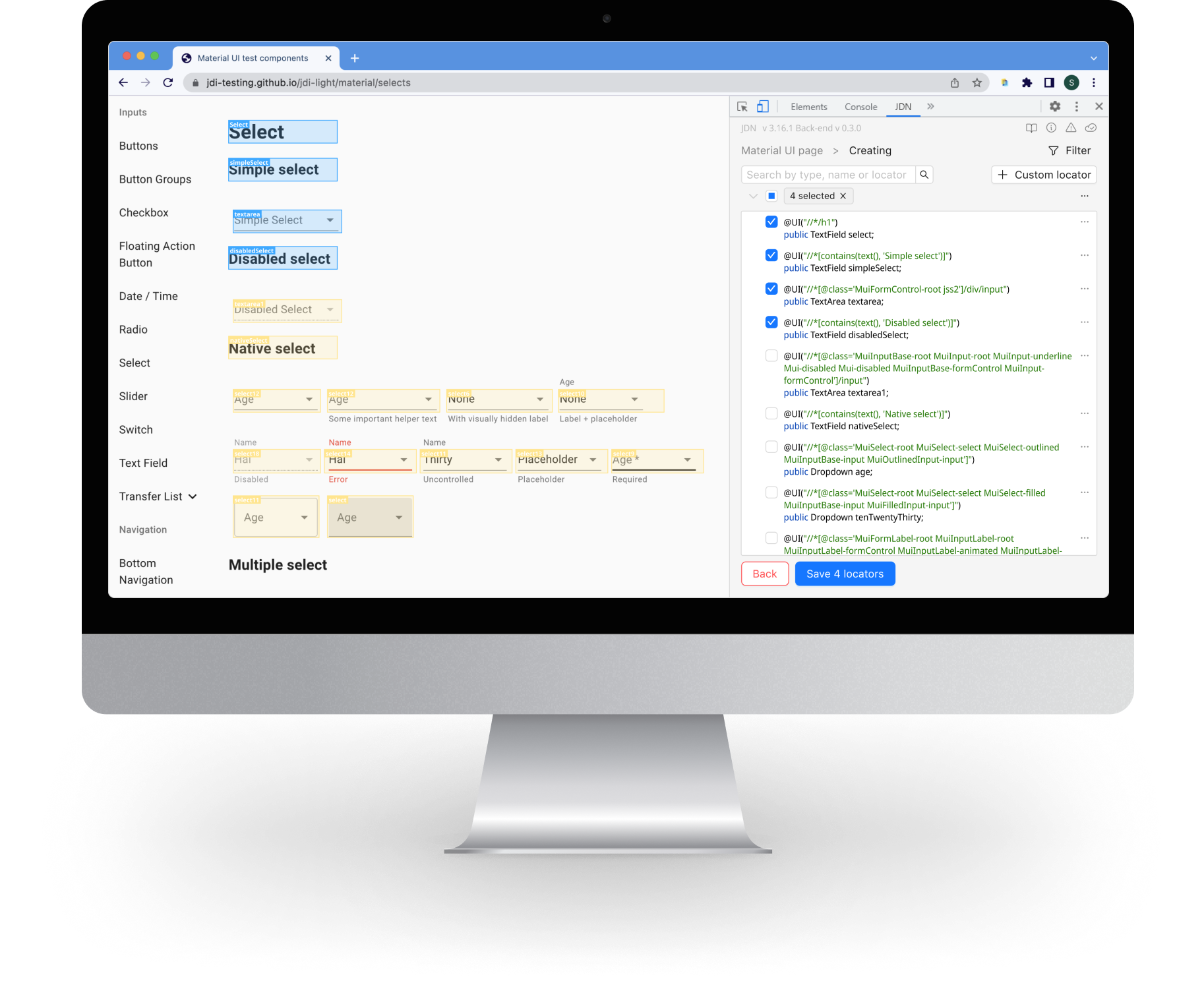
The JDN (Just Do Nothing) plugin is a Google Chrome extension that assists dozens (90+) Test Automation Engineers, as well as two EPAM projects by simplifying the creation of Page Objects for their test automation frameworks.
- Available on Chrome Web Store
- Internal B2B QA tool for automation engineers
- Efficiency booster: Time to create test objects reduced by 60%, 100+ active users
(Mar 2022 - Feb 2024)
Problem
QA engineers and developers spent too much time creating page object models for test automation manually. The old extension had poor UX, unclear navigation, and lacked structure for frequent use.
Goal
- Redesign the extension to make it faster and more intuitive for testers to generate page objects — without writing code
- Project support with new features and enhancements: continuously working on adding new functionalities and improvements to meet the frequently changing needs of the users
Domain: Developer Tooling
Length: 2 years
Team: PM, BA, Dev team and Testers
Role: Lead Designer
What I did
- Conducted in-depth interviews with the target audience, gathering valuable insights and feedback
- Created user personas and scenarios based on QA workflows
- Mapped out the full user journey for “Generate page object” flow
- Formulated problem statements based on the identified user needs and pain points
- Prioritized clarity and speed in navigation and actions
- Worked on diagramming and information architecture to create an intuitive user experience
User personas
Questionnaire, flows and results of tests
I gathered feedback through testing sessions and performed an analysis of the results to identify any issues.
This iterative process allowed me to make necessary enhancements and continually improve a product.
For example:
- Users had trouble finding an action button hidden in additional dropdown menu
- I moved it to the main screen as a shortcut
- Page object creation time dropped by ~30%, and users found it easier to use
Part of interviews
Furthermore:
- Designed and prototyped numerous screens based on the insights gained from testing, making necessary adjustments and enhancements to provide a visual representation of the user experience
- Collaborated closely with the development team to implement new features and improvements
- Ensured that the project remained up-to-date and met the evolving needs of the users
Flow charts
Customer journey map
Key UX decisions as achievements
- Reduced clicks from 7 to 3 for main task
- Grouped key actions into a floating UI panel
- Used inline hints and consistent element highlighting
- Provided copy/export feature and clean instruction for it
results
- During the course of the project, the plugin was successfully released in the Chrome Extension Store, making it available to users
- Improvement in the UX and UI, addressing pain points, and implementing new features according to user expectations
- Time to create a page object reduced by ~60% (measured in internal QA testing)
- Quick adoption: Rapid growth to 100 users in the first months, proving high demand.
Old design / Before
Renewed design / After
Home
About me
Contacts
JDN Browser extension, B2B tool
About Project
The JDN (Just Do Nothing) plugin is a Google Chrome extension that assists dozens (90+) Test Automation Engineers, as well as two EPAM projects by simplifying the creation of Page Objects for their test automation frameworks.
- Available on Chrome Web Store
- Internal B2B QA tool for automation engineers
- Efficiency booster: Time to create test objects reduced by 60%, 100+ active users
(Mar 2022 - Feb 2024)
Problem
QA engineers and developers spent too much time creating page object models for test automation manually. The old extension had poor UX, unclear navigation, and lacked structure for frequent use.
Goal
- Redesign the extension to make it faster and more intuitive for testers to generate page objects — without writing code
- Project support with new features and enhancements: continuously working on adding new functionalities and improvements to meet the frequently changing needs of the users
Domain: Developer Tooling
Length: 2 years
Team: PM, BA, Dev team and Testers
Role: Lead Designer
What I did
- Conducted in-depth interviews with the target audience, gathering valuable insights and feedback
- Created user personas and scenarios based on QA workflows
- Mapped out the full user journey for “Generate page object” flow
- Formulated problem statements based on the identified user needs and pain points
- Prioritized clarity and speed in navigation and actions
- Worked on diagramming and information architecture to create an intuitive user experience
User personas
Questionnaire, flows and results of tests
I gathered feedback through testing sessions and performed an analysis of the results to identify any issues.
This iterative process allowed me to make necessary enhancements and continually improve a product.
For example:
- Users had trouble finding an action button hidden in additional dropdown menu
- I moved it to the main screen as a shortcut
- Page object creation time dropped by ~30%, and users found it easier to use
Part of interviews
Furthermore:
- Designed and prototyped numerous screens based on the insights gained from testing, making necessary adjustments and enhancements to provide a visual representation of the user experience
- Collaborated closely with the development team to implement new features and improvements
- Ensured that the project remained up-to-date and met the evolving needs of the users
Flow charts
Customer journey map
Key UX decisions as achievements
- Reduced clicks from 7 to 3 for main task
- Grouped key actions into a floating UI panel
- Used inline hints and consistent element highlighting
- Provided copy/export feature and clean instruction for it
results
- During the course of the project, the plugin was successfully released in the Chrome Extension Store, making it available to users
- Improvement in the UX and UI, addressing pain points, and implementing new features according to user expectations
- Time to create a page object reduced by ~60% (measured in internal QA testing)
- Quick adoption: Rapid growth to 100 users in the first months, proving high demand.
Old design / Before
Renewed design / After
Home
About me
Contacts
JDN Browser extension, B2B tool
About Project
The JDN (Just Do Nothing) plugin is a Google Chrome extension that assists dozens (90+) Test Automation Engineers, as well as two EPAM projects by simplifying the creation of Page Objects for their test automation frameworks.
- Available on Chrome Web Store
- Internal B2B QA tool for automation engineers
- Efficiency booster: Time to create test objects reduced by 60%, 100+ active users
(Mar 2022 - Feb 2024)

Chrome Web Store
Problem
QA engineers and developers spent too much time creating page object models for test automation manually. The old extension had poor UX, unclear navigation, and lacked structure for frequent use.
Goal
- Redesign the extension to make it faster and more intuitive for testers to generate page objects — without writing code
- Project support with new features and enhancements: continuously working on adding new functionalities and improvements to meet the frequently changing needs of the users
Domain: Developer Tooling
Length: 2 years
Team: PM, BA, Dev team and Testers
Role: Lead Designer
What I did
- Conducted in-depth interviews with the target audience, gathering valuable insights and feedback
- Created user personas and scenarios based on QA workflows
- Mapped out the full user journey for “Generate page object” flow
- Formulated problem statements based on the identified user needs and pain points
- Prioritized clarity and speed in navigation and actions
- Worked on diagramming and information architecture to create an intuitive user experience
User personas
Questionnaire, flows and results of tests
I gathered feedback through testing sessions and performed an analysis of the results to identify any issues.
This iterative process allowed me to make necessary enhancements and continually improve a product.
For example:
- Users had trouble finding an action button hidden in additional dropdown menu
- I moved it to the main screen as a shortcut
- Page object creation time dropped by ~30%, and users found it easier to use
Part of interviews
Furthermore:
- Designed and prototyped numerous screens based on the insights gained from testing, making necessary adjustments and enhancements to provide a visual representation of the user experience
- Collaborated closely with the development team to implement new features and improvements
- Ensured that the project remained up-to-date and met the evolving needs of the users
Flow charts
Customer journey map
Key UX decisions as achievements
- Reduced clicks from 7 to 3 for main task
- Grouped key actions into a floating UI panel
- Used inline hints and consistent element highlighting
- Provided copy/export feature and clean instruction for it
results
- During the course of the project, the plugin was successfully released in the Chrome Extension Store, making it available to users
- Improvement in the UX and UI, addressing pain points, and implementing new features according to user expectations
- Time to create a page object reduced by ~60% (measured in internal QA testing)
- Quick adoption: Rapid growth to 100 users in the first months, proving high demand.
Old design / Before
Renewed design / After