Home
About me
Contacts

Google — Design System for Tools
About Project
Note: The project is under NDA, so unfortunately I can't share more details.
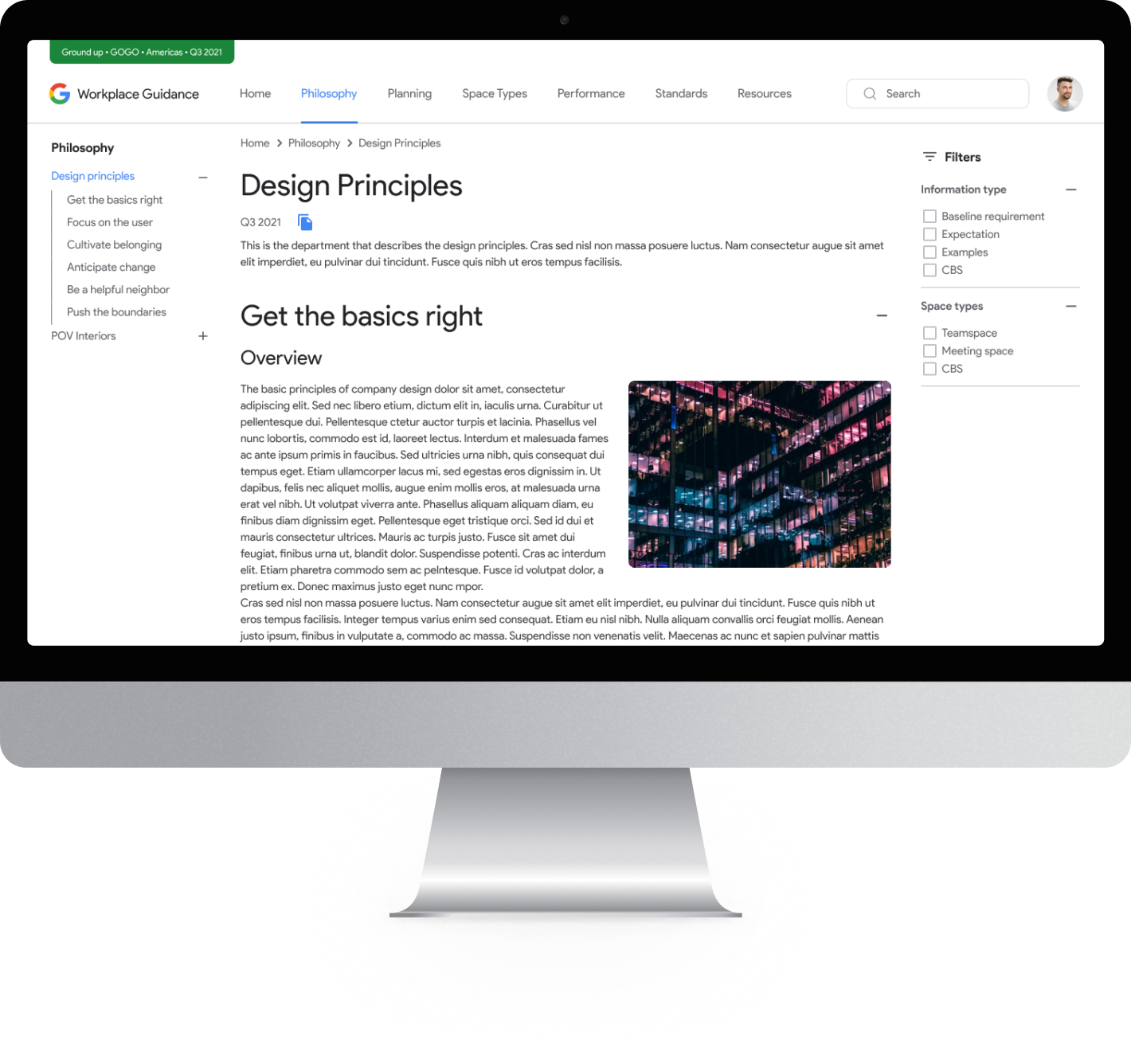
We wanted to create a completely new approach to designing infinite internal websites in company. This involved the development of a block system for website design and the creation of two websites as an example.
The intended users of these websites were dozens of managers in Google, while the final content was accessible to potentially thousands of their employees.
- Top 1 Global Tech Company, revenue $300B+
- Internal B2B tools and infrastructure
- Scalable design system for internal Google tools: used in automation, resource mgmt.
(Jul 2021 - Mar 2022)
Problem
Google’s PA&WG team needed a system to let non-designers create internal web pages using modular blocks — without relying on design or dev support. The existing tools were inconsistent and slow to scale.
The new system also had to support developer efficiency through reusable patterns and include clear documentation for employees with no design background.
Goal
- Design and build a UI system that enables:
- Fast assembly of internal pages by non-designers
- Component reuse and consistency across Google internal tools
- Developer-friendly architecture for easy maintenance and scaling
- Clear documentation to support users with no prior design/tool experience
Software & Hi-Tech
Length: 9 months
Team: 4 Designers
Role: UI Designer
Style Guide & UI Kit
Firstly I initiated the process by developing a UI Kit. I meticulously crafted a comprehensive library consisting of multiple pages, encompassing various elements accompanied by detailed descriptions. These elements served as the building blocks for creating numerous pre-designed modules.
Additionally, I meticulously constructed a comprehensive style guide and accessibility guide, aligning with WCAG 3.0 standards, to ensure consistency across templates. These guides provided detailed instructions on usage for both managers and developers, facilitating the seamless implementation of the designs.
templates
The website development block system comprises a wide range of standardized templates, each adhering to consistent rules and sharing some of uniform characteristics. I have diligently created an extensive collection of these templates to fulfill the diverse requirements of the project.
These templates serve as Lego-blocks, allowing for the seamless design and construction of websites. With this system, it is easy to organize and populate a websites with the necessary information, creating a cohesive and visually appealing website without the need for groups of developers.
What I did
As a UI Designer, I:
- Created a comprehensive UI Kit, style guide, templates and module library
- Ensured that all components had detailed descriptions for easy usage
- Designed over 50 high-fidelity layouts
- Created fully functional working prototypes with animations to showcase the final outcome
System Deliverables
- UI Kit: Buttons, inputs, cards, containers, forms
- Grid and layout system: Responsive, scalable containers
- Modules: Composite components (e.g., announcement banners, metric blocks, team lists)
- User Guide: Step-by-step handbook for internal teams (non-designers)
- Design-to-code flow: Compatible with Storybook and dev pipelines
Base components example
Miroring
Library of blocks for system
results
- Empowered internal managers to create and update pages without design or dev support
- Reduced information distribution time within the company, enhancing overall efficiency
- The need for dedicated dev-teams has partially disappeared, which has allowed saving resources and expanding the manager's ability to control their content
- Transformed “information storage” from paper formats to a digital and accessible format
- Enabled effortless information design and management for managers through intuitive site editing functions and a block system
What I learned
- The real value of a design system is in how well it’s understood and used — not how perfect it looks
- Building for non-designers forces clarity and modular thinking
Home
About me
Contacts
Google — Design System for Tools
About Project
Note: The project is under NDA, so unfortunately I can't share more details.
We wanted to create a completely new approach to designing infinite internal websites in company. This involved the development of a block system for website design and the creation of two websites as an example.
The intended users of these websites were dozens of managers in Google, while the final content was accessible to potentially thousands of their employees.
- Top 1 Global Tech Company, revenue $300B+
- Internal B2B tools and infrastructure
- Scalable design system for internal Google tools: used in automation, resource mgmt.
(Jul 2021 - Mar 2022)
Problem
Google’s PA&WG team needed a system to let non-designers create internal web pages using modular blocks — without relying on design or dev support. The existing tools were inconsistent and slow to scale.
The new system also had to support developer efficiency through reusable patterns and include clear documentation for employees with no design background.
Goal
- Design and build a UI system that enables:
- Fast assembly of internal pages by non-designers
- Component reuse and consistency across Google internal tools
- Developer-friendly architecture for easy maintenance and scaling
- Clear documentation to support users with no prior design/tool experience
Software & Hi-Tech
Length: 9 months
Team: 4 Designers
Role: UI Designer
Style Guide & UI Kit
Firstly I initiated the process by developing a UI Kit. I meticulously crafted a comprehensive library consisting of multiple pages, encompassing various elements accompanied by detailed descriptions. These elements served as the building blocks for creating numerous pre-designed modules.
Additionally, I meticulously constructed a comprehensive style guide and accessibility guide, aligning with WCAG 3.0 standards, to ensure consistency across templates. These guides provided detailed instructions on usage for both managers and developers, facilitating the seamless implementation of the designs.
templates
The website development block system comprises a wide range of standardized templates, each adhering to consistent rules and sharing some of uniform characteristics. I have diligently created an extensive collection of these templates to fulfill the diverse requirements of the project.
These templates serve as Lego-blocks, allowing for the seamless design and construction of websites. With this system, it is easy to organize and populate a websites with the necessary information, creating a cohesive and visually appealing website without the need for groups of developers.
What I did
As a UI Designer, I:
- Created a comprehensive UI Kit, style guide, templates and module library
- Ensured that all components had detailed descriptions for easy usage
- Designed over 50 high-fidelity layouts
- Created fully functional working prototypes with animations to showcase the final outcome
System Deliverables
- UI Kit: Buttons, inputs, cards, containers, forms
- Grid and layout system: Responsive, scalable containers
- Modules: Composite components (e.g., announcement banners, metric blocks, team lists)
- User Guide: Step-by-step handbook for internal teams (non-designers)
- Design-to-code flow: Compatible with Storybook and dev pipelines
Base components example
Miroring
Library of blocks for system
results
- Empowered internal managers to create and update pages without design or dev support
- Reduced information distribution time within the company, enhancing overall efficiency
- The need for dedicated dev-teams has partially disappeared, which has allowed saving resources and expanding the manager's ability to control their content
- Transformed “information storage” from paper formats to a digital and accessible format
- Enabled effortless information design and management for managers through intuitive site editing functions and a block system
What I learned
- The real value of a design system is in how well it’s understood and used — not how perfect it looks
- Building for non-designers forces clarity and modular thinking
Home
About me
Contacts
Google — Design System for Tools
About Project
Note: The project is under NDA, so unfortunately I can't share more details.
We wanted to create a completely new approach to designing infinite internal websites in company. This involved the development of a block system for website design and the creation of two websites as an example.
The intended users of these websites were dozens of managers in Google, while the final content was accessible to potentially thousands of their employees.
- Top 1 Global Tech Company, revenue $300B+
- Internal B2B tools and infrastructure
- Scalable design system for internal Google tools: used in automation, resource mgmt.
(Jul 2021 - Mar 2022)
Problem
Google’s PA&WG team needed a system to let non-designers create internal web pages using modular blocks — without relying on design or dev support. The existing tools were inconsistent and slow to scale.
The new system also had to support developer efficiency through reusable patterns and include clear documentation for employees with no design background.
Goal
Design and build a UI system that enables:
- Fast assembly of internal pages by non-designers
- Component reuse and consistency across Google internal tools
- Developer-friendly architecture for easy maintenance and scaling
- Clear documentation to support users with no prior design/tool experience
Domain: Software & Hi-Tech
Length: 9 months
Team: 4 Designers
Role: UI Designer
Style Guide & UI Kit
Firstly I initiated the process by developing a UI Kit. I meticulously crafted a comprehensive library consisting of multiple pages, encompassing various elements accompanied by detailed descriptions. These elements served as the building blocks for creating numerous pre-designed modules.
Additionally, I meticulously constructed a comprehensive style guide and accessibility guide, aligning with WCAG 3.0 standards, to ensure consistency across templates. These guides provided detailed instructions on usage for both managers and developers, facilitating the seamless implementation of the designs.
templates
The website development block system comprises a wide range of standardized templates, each adhering to consistent rules and sharing some of uniform characteristics. I have diligently created an extensive collection of these templates to fulfill the diverse requirements of the project.
These templates serve as Lego-blocks, allowing for the seamless design and construction of websites. With this system, it is easy to organize and populate a websites with the necessary information, creating a cohesive and visually appealing website without the need for groups of developers.
What I did
As a UI Designer, I:
- Created a comprehensive UI Kit, style guide, templates and module library
- Ensured that all components had detailed descriptions for easy usage
- Designed over 50 high-fidelity layouts
- Created fully functional working prototypes with animations to showcase the final outcome
System Deliverables
- UI Kit: Buttons, inputs, cards, containers, forms
- Grid and layout system: Responsive, scalable containers
- Modules: Composite components (e.g., announcement banners, metric blocks, team lists)
- User Guide: Step-by-step handbook for internal teams (non-designers)
- Design-to-code flow: Compatible with Storybook and dev pipelines
Base components example
Usage of mirroring method in Component library
Library of blocks for system
results
- Empowered internal managers to create and update pages without design or dev support
- Reduced information distribution time within the company, enhancing overall efficiency
- The need for dedicated dev-teams has partially disappeared, which has allowed saving resources and expanding the manager's ability to control their content
- Transformed “information storage” from paper formats to a digital and accessible format
- Enabled effortless information design and management for managers through intuitive site editing functions and a block system
What I learned
- The real value of a design system is in how well it’s understood and used — not how perfect it looks
- Building for non-designers forces clarity and modular thinking